How to Set Motor Cut on RadioLink AT10II, AT10, AT9S Pro, AT9S, and AT9 Transmitters?
How to quickly stop accidental motor operation in electrically powered aircraft?
The manual is applicable to AT9/AT9S/AT10/AT10II.
(* please be kindly note that the detailed setting steps are only for reference, pilots can personalize the setup with his own habits)
Steps:
① Choose a two-position switch you wish to inhibit throttle operation.
Take MODEL TYPE: MULTIROTR and Switch F as an example
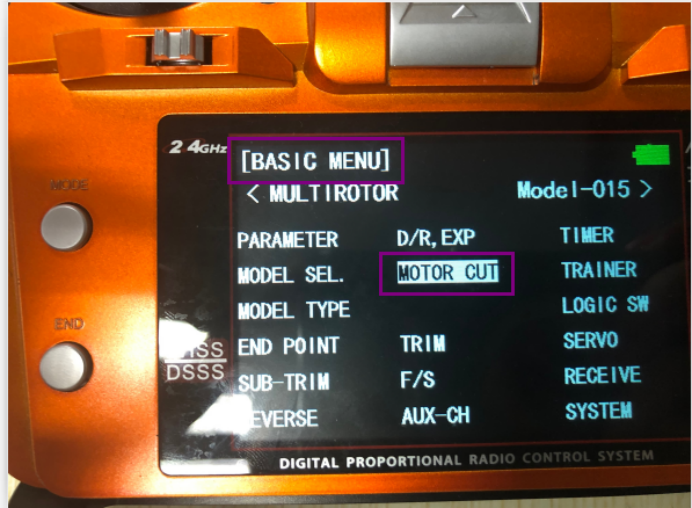
② Long press MODE to enter Basic Menu => scroll to highlight MOTOR CUT => Press PUSH to enter with Switch F in DOWN POSITION

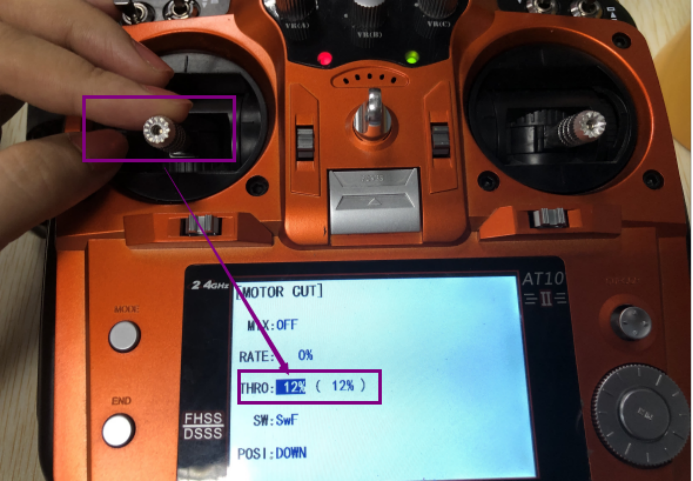
③ Scroll the switch as SwF => Scroll the POSI: DOWN => Scroll the MIX: OFF => Scroll to highlight the percentage of THRO and pull the throttle to the preferred bottom point => Press PUSH for 1s and the percentage is set

Note:
The THRO percentage (e.g., 12%) means motors will stop when the throttle stick is pulled to the set position (e.g., 12% from the bottom point). It is advised to set the percentage between 10-20%.
The RATE percentage means to increase/decrease throttle sensitivity. E.g., If RATE is set as +3% and the throttle stick is pushed to 20%, meaning the servo will response as 20.6% fast.
④ When the parameters in MOTOR CUT are set, please verify if the motors are cut as you wish.
MIX: OFF RATE: 1% THRO: 12% (12%) SW: SwF POSI: DOWN
=> Arm the model and the AT10II by pulling the throttle stick to the right bottom
=> Gently push the throttle stick and check motors DO respond when switch F is in the DOWN position
=> Switch F to UP position, the transmitter CANNOT be armed, and the motors DO NOT respond
During the flight with switch F is DOWN and motors moving, pilots can THROTTLE CUT by turning switch F UP and pulling the throttle stick to the 12% then the motors will stop.